Capture Web Pages Like a Pro: Complete Guide
Ever clicked a link only to be met with the dreaded 404 error? It happens to all of us.
#Why Smart People Are Archiving Everything

Ever clicked a link only to be met with the dreaded 404 error? It happens to all of us. One minute you're chasing down some crucial piece of information, the next you're staring into the internet abyss. Important articles, research papers, even that hilarious meme you wanted to share – poof, gone. This is why proactive web capture has become such a vital skill. I've seen firsthand how frustrating this can be for researchers, writers, and even casual internet users. A historian friend of mine once lost months of work when a small blog she'd been referencing vanished without a trace.
But this isn't just an academic problem. Imagine needing to check the specs on a product you’re about to buy, only to find the page has been taken down. Talk about inconvenient. It makes you realize how much we rely on the web's permanence, even though it's anything but permanent. We bookmark things, intending to go back, but how often do those bookmarks actually work after a few months?
The web is incredibly transient. Think about the sheer volume of data being generated every single day. We're talking 181 zettabytes by the end of 2025, and get this – 90% of the world's data was created in just the last two years! These big data stats are mind-boggling. This makes capturing the information you need even more critical.
So, what separates the truly "smart" internet users? They don't just bookmark; they archive. They treat web capture like a professional skill, understanding the value of owning their data. This is where tools like Reseek come into play. Reseek makes capturing web content a breeze. Copy a URL—any URL, whether it's an article, a product page, or anything else—and Reseek not only saves the link, but scrapes the actual content. Title, description, images – it grabs everything.
But Reseek goes even further. It takes that captured content and puts it into a vector database. This isn't just about taking a snapshot; it's about making your archived information truly searchable. Imagine being able to search your own personal web archive using natural language or AI-powered semantic search. No more digging through outdated bookmarks. You essentially have your own search engine for the information you’ve saved. It turns what could be a messy collection of saved links into a powerful, personalized knowledge base. This is the future of web capture, and it's why more and more people are looking for solutions that offer both preservation and searchability.
Your Browser's Hidden Capture Superpowers
Forget expensive software! Your browser is a secret weapon when it comes to capturing web pages. I'm talking about those built-in features that most people completely overlook. Having spent way too much time playing around with Chrome, Firefox, Safari, and Microsoft Edge, I've discovered some real gems… and some serious duds. So, let’s dive into the good, the bad, and the ugly of browser-based web capture.
This is a screenshot of the Chrome browser. Simple, clean interface, right? Address bar, tabs, menu options—all clearly visible. While it looks minimalist, there’s a surprisingly powerful capture engine humming away under the hood.
One surprisingly effective method? Print-to-PDF. Seriously, this has saved my bacon more times than I can count when I need to preserve a page's layout. "Save Page As" can often mangle formatting, but print-to-PDF usually keeps things looking pretty decent. One caveat: it doesn’t always handle dynamic content well. Interactive maps or anything with complicated Javascript? Those elements can sometimes get lost in the shuffle.
#Exploring Built-In Browser Capture Tools
Let's compare some common browser capture tools and their quirks:
To make things clearer, here's a table comparing the different browser capture methods:
Browser Capture Methods Comparison
| Browser | Built-in Method | File Format | Preserves Layout | Includes Media | Best For |
|---|---|---|---|---|---|
| Chrome | Print-to-PDF | Excellent | Usually | Archiving, sharing formatted content | |
| Chrome | Save Page As | HTML, Complete Webpage | Fair | Sometimes | Simple, static pages |
| Firefox | Print-to-PDF | Good | Usually | Similar to Chrome | |
| Firefox | Save Page As | HTML, Complete Webpage | Fair | Sometimes | Similar to Chrome |
| Safari | Print-to-PDF | Good | Usually | Similar to Chrome | |
| Safari | Export as PDF | Excellent | Usually | Archiving, sharing formatted content | |
| Edge | Print-to-PDF | Good | Usually | Similar to Chrome | |
| Edge | Save Page As | HTML, Complete Webpage | Fair | Sometimes | Similar to Chrome |
As you can see, each method has its own strengths and weaknesses. Picking the right one depends on what you need from the captured page. PDF is generally your best bet for preserving layout, while "Save Page As" can be handy for grabbing the underlying code.
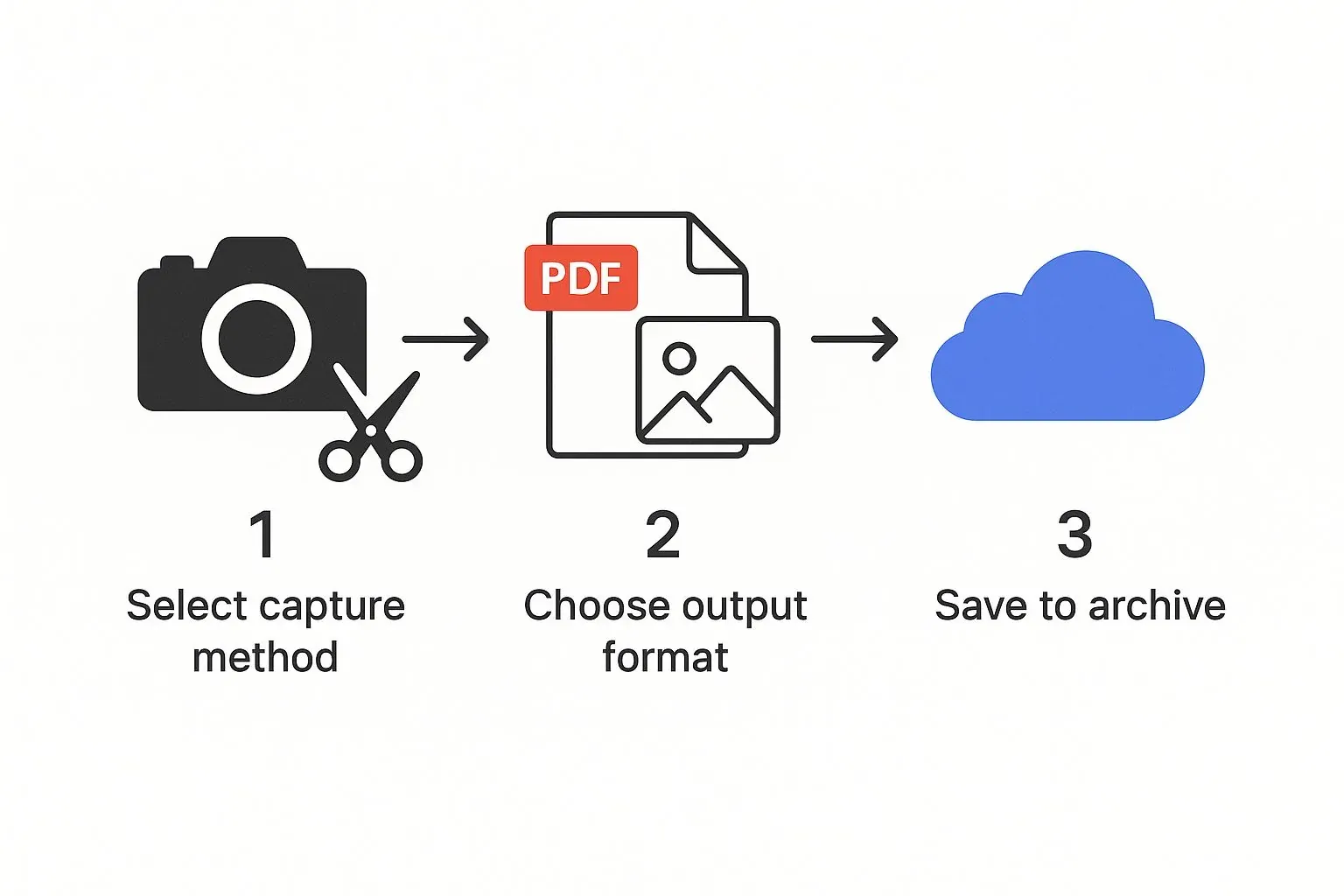
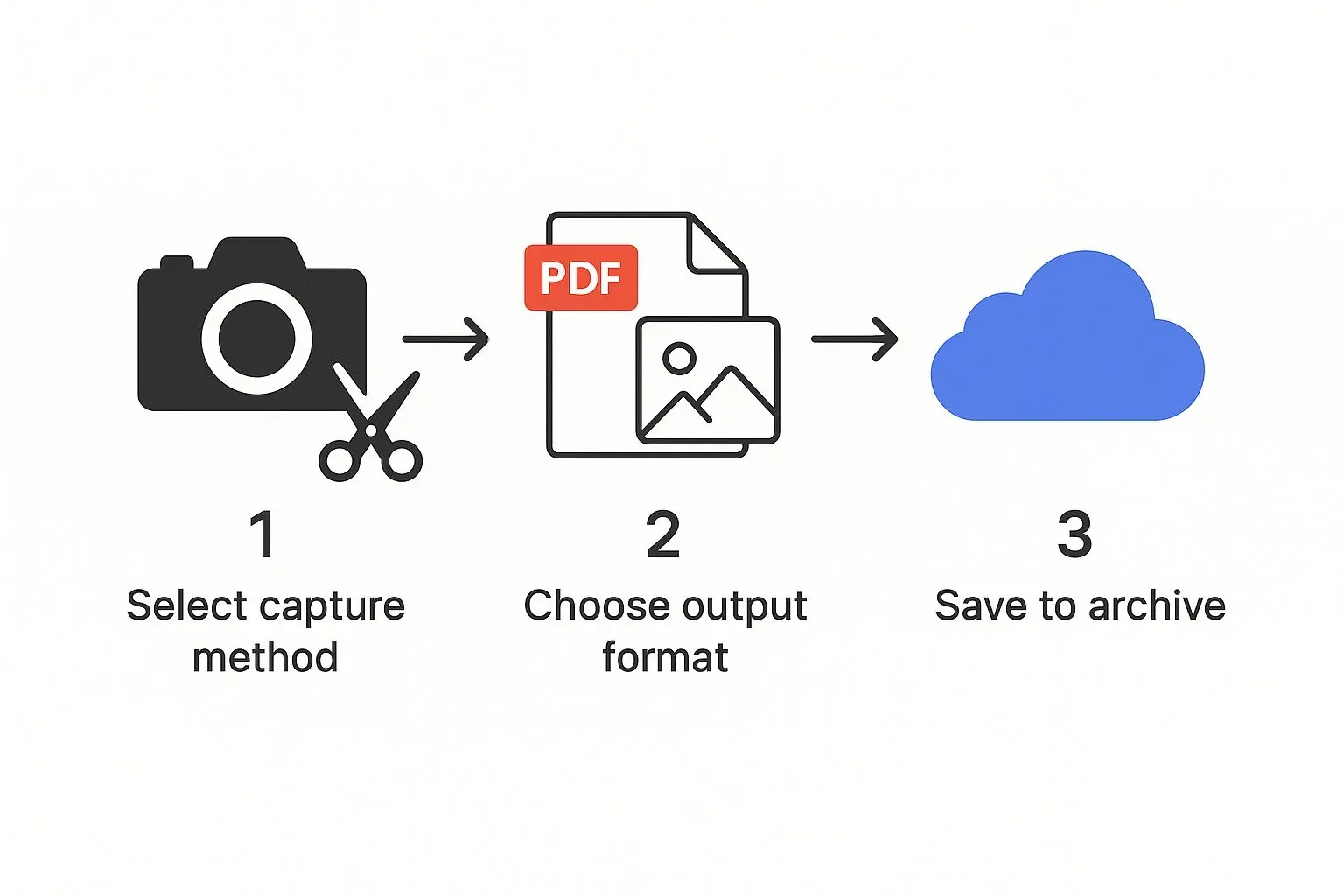
This infographic illustrates the basic capture process: Choose your capture method, pick your output format, and save. Simple enough in theory, but as we’ve seen, the reality can be a bit more… nuanced. The results really depend on the browser and the complexity of the page you’re trying to capture.
"Save Page As" is another option, letting you save as HTML or a complete webpage. The idea is that it saves everything. The reality is…well, it’s a mixed bag. Sometimes it works perfectly, other times it’s a total train wreck, particularly with more complex websites. I’ve seen entire image galleries disappear and CSS styles go completely haywire. It’s definitely not the most reliable method, but it’s worth trying if you're dealing with relatively static content.
#Going Beyond Static Captures with Reseek
Now, remember how we talked earlier about the importance of capturing more than just links? This is where Reseek really shines. If you’re bookmarking articles, products, or really anything else online, Reseek doesn’t just save the link. It also scrapes all the essential data: the title, description, images – everything that makes that link valuable. Even better, it then uses this information to build a searchable archive of your saved content. Reseek offers a much more powerful approach to web capture – it goes beyond a simple static snapshot and builds a dynamic, searchable knowledge base of your important web content.
#Extensions That Change Everything
Browser extensions are key to truly effective web capturing. They take your browser from a simple viewing tool and transform it into a powerful archiving machine. I’m talking about the extensions serious researchers and content creators rely on – the ones that actually get the job done.
This screenshot shows the Chrome Web Store, a gold mine of extensions:
The sheer number of extensions can feel overwhelming, which underscores the importance of picking the right ones for your web capturing needs. Finding the best tools for your workflow is essential.
For example, SingleFile is a game-changer. It saves entire web pages, including all the styling and images, into a single, self-contained HTML file. This is incredibly useful for preserving content that might disappear due to broken links or website updates. There are also extensions specifically for academics, like ones that automatically format citations. Think about capturing a web page and instantly having the citation ready in your preferred style. Now that's a time-saver.
#Choosing the Right Extensions for Your Workflow
However, not all extensions are created equal. I’ve tested many that didn’t live up to the hype. Some are loaded with unnecessary features, while others might compromise your privacy. This is why it's crucial to do your homework before installing anything. Look for extensions with strong reviews from other users. Think about what you specifically need from an extension. Do you need to capture whole pages or just specific sections? How often are you working with dynamic content? Answering these questions will help you choose the right tools.
#Reseek and Extensions: A Powerful Combination
You might find this interesting: our guide on the best bookmark managers. This highlights another critical part of web capturing – making your saved content usable. Remember how we talked about Reseek’s ability to scrape content and build a searchable archive? Well, it works seamlessly with many browser extensions. For instance, you can combine a web capturing extension with Reseek’s ability to extract key information and add it to its vector database. This lets you easily rediscover important articles based on keywords or even concepts.
#Privacy and Security Considerations
Finally, let’s talk privacy. Some extensions need access to your browsing history or other sensitive data. Always check what permissions an extension asks for before you install it. Stick to extensions from trusted developers, and be wary of anything that seems too good to be true. Protecting your privacy is paramount, particularly when using tools that can access your online activity. It’s like choosing a lock for your front door – you need something reliable. By carefully selecting your extensions, you’re ensuring both efficient and safe web capturing. This helps build a robust and secure personal web archive.
#Reseek: The Smart Way To Capture and Search Everything
We've covered browsers and extensions—they're definitely handy. But let's face it, managing saved web pages can sometimes feel overwhelming. That's where Reseek comes in. It offers a whole new way to not just capture, but search everything you save online. Think of it less like a bookmarking tool and more like a personal web archiving assistant.
This screenshot shows the Reseek interface. It's clean and intuitive, putting the emphasis on search and organization. The goal isn't just saving links, it's making them easily accessible later. The real game-changer is how Reseek combines capturing and searching. You're not just creating a digital graveyard of links; you're building a dynamic, searchable knowledge base.
#From URL to Searchable Archive
Here's the lowdown: you copy any URL—an article, product page, even a social media post—and paste it into Reseek. The magic happens behind the scenes. Reseek doesn't just save the link; it intelligently scrapes the content. That means it pulls the title, description, images, and even the full text. It essentially captures everything important from that page. This solves a major headache with traditional bookmarking—dead links. Even if the original page vanishes, you've still got the content safe and sound in Reseek.
#The Power of Vector Databases
Reseek takes it a step further. It feeds all that scraped data into a vector database. This is the secret ingredient that makes your saved content truly searchable. Imagine the difference between tossing papers in a box and having a librarian who knows exactly what you need. With a vector database, you can search using natural language and AI-powered semantic search. No more being limited by keywords! Reseek understands the meaning of your search and can find relevant content even if the exact words aren't there.
#Real-World Applications
Let's say you're analyzing a competitor's marketing strategy. Capture all their relevant web pages with Reseek, then easily search your archive for mentions of specific campaigns, product launches, or even customer sentiment. Your saved content becomes a powerful research tool. Or maybe you're a student building a research library. Reseek can help you capture and organize articles, papers, and other online resources, making it easy to find what you need when you need it.
#Solving the Dead Link Dilemma
Remember that frustrating feeling of clicking a dead link when you need something important? Reseek eliminates that. By capturing the actual content, not just the link, your archive stays valuable even if the original source goes offline. And the vector database transforms your archive from a static collection of files into a dynamic, searchable knowledge base. You're not just saving web pages; you're building a personal library of information you can actually use. It turns information hoarding into a strategic advantage.
#Mastering Tricky Content Types
Let's be real: capturing web pages can be a mixed bag. Some are easy, others… well, others feel like wrestling smoke. Think interactive dashboards that go blank the second you try to save them, disappearing social media posts, and video-heavy pages that seem designed to break every tool you've got. I've been there, trust me. It's a headache. But after a lot of experimenting (and some serious frustration), I've picked up a few tricks that actually work.
#Taming the Wild Web: Strategies for Challenging Content
Dynamic content is one of the biggest culprits. Imagine websites with real-time updates, like stock tickers or live sports scores. A static image of these is about as useful as a chocolate teapot. Interactive maps and product configurators also tend to vanish or stop working when you use standard capture methods. Specialized browser extensions can be lifesavers here. Some are built to grab the entire page state, including those dynamic bits. But even then, it’s not always a guarantee. You might need to try a few to find one that consistently works for a particular site.
Then there's the dreaded paywall. You find an amazing article, and BAM! Blocked. Especially frustrating when you're trying to build an archive. One workaround I've used is printing to PDF before the paywall appears. Sometimes it works, sometimes it doesn't. Another option is checking if the content lives in an academic database or library resource, which often bypasses paywalls.
#Archiving Social Media and Other Elusive Content
Social media archiving is a whole different beast. Platforms like Twitter/X are in constant flux, and content can disappear in a flash. For a deep dive into this, check out our guide on social media archiving. Screenshots are quick and easy, but they lack context and aren't searchable. Dedicated social media archiving tools offer more complete solutions, but they often come with their own limitations.
Forum discussions, with all their nested replies, can also be tough to capture. Some forums offer the option to export threads as text files, which is the ideal scenario. If not, browser extensions designed for full-page captures can sometimes do the trick. Just make sure you scroll through the entire discussion to load all the replies before capturing.
#Reseek: Simplifying Web Capture for Complex Content
Now, let's talk about Reseek. I mentioned earlier that it scrapes content and stores it in a vector database. This changes everything for complex content. Saving a URL in Reseek isn't just about the link; Reseek captures the actual content—title, description, images, and even the full text. Even if the original page changes or vanishes, you retain a copy. This is a game-changer for things like product pages with detailed specs, which can be invaluable for future reference. Reseek’s smart scraping, combined with its searchable database, offers a powerful way to manage even the most complicated content types, transforming your saved information into a truly useful resource.
Let's look at a table summarizing some of these challenges and how to approach them:
Content Type Capture Strategies: Best practices for capturing different types of web content with recommended tools and techniques
| Content Type | Main Challenge | Recommended Tool | Key Technique | Success Rate |
|---|---|---|---|---|
| Dynamic Content (e.g., stock tickers, live scores) | Content constantly updates, making static captures useless. | Specialized Browser Extensions (e.g., GoFullPage) | Capture full page state including dynamic elements. | Varies depending on website and extension. |
| Paywalled Content | Restricted access prevents capturing. | Browser Print-to-PDF function, Academic Databases | Print to PDF before paywall appears, or access through library resources. | Moderate, not always reliable. |
| Social Media Posts | Content is ephemeral and platforms constantly evolve. | Screenshots, Dedicated Social Media Archiving Tools | Capture screenshots for quick saves, or use dedicated tools for more comprehensive archiving. | Screenshots are simple but lack context. Archiving tools have limitations. |
| Forum Discussions | Capturing nested replies and long threads can be difficult. | Browser Extensions (e.g., GoFullPage), Forum Export Feature | Use extensions for full-page capture or look for forum export options. | Moderate; scrolling may be required for full capture. |
| Product Pages with Detailed Specs | Information can change or disappear over time. | Reseek | Save URL to Reseek for content scraping and archiving. | High, due to content scraping and storage. |
This table outlines some common challenges and solutions. Remember, the best approach often depends on the specific website and content you're dealing with. Experimenting with different tools and techniques is key.
#Building Your Personal Web Archive That Works
Random saved files scattered across your desktop? That's not an archive, it's digital chaos. Let's talk about building a system that actually works for you years down the line, not just satisfies that immediate "gotta save this somewhere" urge. I've chatted with folks who've really nailed personal archiving, and the common thread is a solid structure: smart naming conventions, organized folders, and a tagging system that's actually helpful. Trust me, when you're desperately searching for something at 2 AM, a clear system is a lifesaver.
Another key ingredient is integration. Your capture tools should play nicely with your existing workflow. Whether you're a Notion whiz, an Obsidian fanatic (check out their new Web Clipper), or a lover of good old-fashioned folders, the right integration can make all the difference. Imagine capturing a web page, and it lands directly in your note-taking app, formatted and ready for your annotations. That's a research workflow dream come true.
#Structuring Your Archive for Long-Term Success
Speaking of long-term, future-proofing is paramount. Formats change, software goes extinct. How do you ensure your archive is accessible for years to come? Favoring plain text whenever possible is a great strategy. Plain text is incredibly resilient and can be opened by pretty much anything. For more complex content, consider open formats like PDF/A, specifically designed for long-term archiving. This frees you from the shackles of specific software down the road.
Take the Internet Archive's End of Term (EOT) Web Archive project, for example. They understand the importance of preservation. In their 2024/2025 cycle, they've already pulled in over 500 terabytes of data, including over 100 million unique web pages. This massive crawl isn't limited to .gov and .mil domains either; they're also grabbing government-related content on .org, .edu, and more. This article provides further insights into data preservation. It really highlights the scope of preserving web content.
#Maintaining Your Archive Without the Headache
Building the archive is only half the battle, though. Maintenance is key. From my own experience, even a few minutes each week tidying up new captures can prevent things from turning into an unmanageable monster. Regularly reviewing your tagging system and purging redundant files is crucial, too. Think of it like gardening – a little pruning keeps everything healthy and thriving.
This brings us back to Reseek. Remember how I mentioned it scrapes web content? When you paste a URL into Reseek, it automatically grabs the title, description, image, and full text, feeding it all into a vector database for semantic search. This is a game-changer for managing captured pages. Imagine saving a product link, and Reseek not only saves the page but also extracts all the key details, making them searchable later. This article about social media bookmark mastery might also interest you. Reseek transforms web page capturing from a chore into a seamless part of your workflow. It helps you build a valuable, searchable archive that grows with you. This is more than just saving links—it's building a personal knowledge base.
#Your Personal Web Capture Action Plan
So, we've covered a bunch of different ways to capture web pages. Now, let's figure out a system that actually works for you. This isn't about strict rules, it's about finding a groove that fits your workflow. Whether it's for academic research, work projects, or just saving cool articles, a personalized web capture action plan is key.
#Choosing Your Tools and Setting Realistic Goals
Think about your go-to tools. Are you mostly using browser extensions, built-in browser features, or a dedicated platform like Reseek? Maybe a mix of everything? There's no single right answer. Personally, I use browser extensions for quick saves and Reseek for anything I really want to dig into later. Also, be realistic about your goals. Are you building a massive research archive, or just saving interesting reads? Realistic goals keep you from getting overwhelmed. Don't try to capture everything at once. Start small, focus on what's important, and gradually build your system.
#Creating a Capture Checklist and Troubleshooting Guide
A simple checklist is incredibly helpful. Here's a glimpse of mine:
- Is the page static or dynamic? This helps you decide the best way to capture it.
- Do I need the whole page, or just parts of it? This influences your tool choice.
- How will I organize this? Tags? Folders? Both?
And let's face it, sometimes things go sideways. A screenshot might fail, a webpage might change its format, or an extension could stop working. Having a troubleshooting plan can save you a lot of headaches. Mine includes checking for extension updates, trying different capture methods, and as a last resort, contacting the website's support (you never know!).
#Building and Maintaining Your Archive Over Time
Building a good archive takes time. Don't expect a perfect system overnight. I started simple, with basic folders and tags, and it’s evolved over time. It's a work in progress. Reseek's web scraping ability is a game changer here. Saving a URL in Reseek doesn't just save the link. It grabs the title, description, images, and full text, adding it all to its vector database for powerful semantic search. Think about bookmarking a product link, and Reseek automatically grabbing all the product info for you to search later. That’s the beauty of a truly integrated capture system.
Maintaining your archive shouldn't be a drag. A quick weekly review to organize new captures and delete duplicates keeps things manageable. The point is to build a system that helps you, not creates more work. This keeps things organized and saves you time in the long run.
Ready to take charge of your web captures? Start a free trial with Reseek and turn your digital clutter into a powerful, searchable knowledge base.